
Back To All Posts
Facebook for Business: The Ultimate Guide

Facebook is the largest social network in the world. It has over one billion active users with more than half of them using Facebook on a mobile device. Find out about the best ways to tap into this gigantic marketing opportunity for business.
The business case for using Facebook
- The average user spends nearly seven hours on Facebook per month, has approx 130 friends and likes 80 pages
- Facebook is the leading source of referral social media traffic at 26%
- 77% of B2C companies report that they have acquired customers through Facebook
- 56% of consumers say they are more likely to recommend a brand after becoming a fan
- 57% of Facebook users who have liked a brand have shared a link or video about a brand
- 42% of people have mentioned a brand in one of their Facebook status updates
- Of all social media, 47% of Americans say that Facebook has the most impact on their purchase behaviour
EdgeRank
Edgerank is the Facebook algorithm that determines which stories appear in each user’s news-feed. Regardless of how many fans a page has, research indicates that pages on average only reach about 17% of their Facebook fans. E.g. a page with 20K fans will reach 3,400 fans.
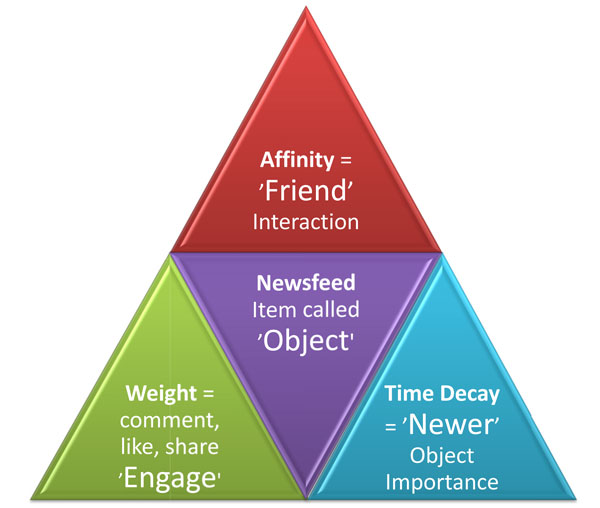 The three factors that affect Edgerank are:
- Affinity
- Edge Weight
- Time Decay
Affinity
Affinity is based on closeness on Facebook. How “friendly” you are and how much you “interact”? Liking, viewing, commenting and sharing send a proactive signal of closeness.
- Activities that require higher levels of user engagement get a higher score. Leaving a comment takes more effort than clicking the “Like” button.
- The more you interact with a person or a page, the higher their affinity score.
- But affinity only works one way; you can’t increase your affinity score in another user’s feed by constantly clicking on their “Like” buttons.
Edge Weight
Edge Weight determines which types of content are more important. The three types of content which are understood to have the highest weighting are:
- Videos
- Photos
- Links
Each person’s Edge Weight is different on Facebook, i.e. someone who likes photographs is more likely to have them in their feed than someone who doesn’t.
Time Decay
The final factor that determines EdgeRank is recency also known as time decay. The older an update, the less likely it is to appear.
Posting strategy
Understand Edgerank and you will see that it creates an “engagement” challenge and opportunity for managers of Facebook pages.
- Businesses want to promote their products and get more customers. What’s the point of being on there unless you are getting an ROI?
- But success on Facebook depends on driving engagement, i.e. reaching more people means getting more likes, more comments, more shares and more fans.
- Promotion and engagement don’t often easily go together. It is difficult for businesses to create updates that are both engaging and promote – at the same time!
Plan
That means your posting strategy may include 2 types of status updates but should be weighted in favour of engagement.
- The correct ratio will be different from business to business but a good place to start is either 3:1 or 2:1.
- Edge weight means that where possible, all updates should include video, picture and/or links.
- Plan to post regularly. Time decay requires that an effective posting strategy is also a consistent one.
Interaction
As outlined, engagement updates will make up the majority of your posts, – the objective here is to get:
- Comments
- Likes
- Shares
- Fans
Examples of engagement type updates that you can use to drive interaction:
- Ask questions
- Fill in the blank
- Post photos
- Talk about the news
- Ask for likes
- Target different fans
- Talk about Facebook
- Celebrate today
Customers
Your existing customers should be your natural brand ambassadors on Facebook, provided:
- You let them know
- Engage with them in the right way.
Here are some ways that you can engage your customers via Facebook
Networking
Strengthen your customer relationships by mentioning and promoting them on Facebook.
- Status-tagging (use the @ symbol) is a great networking tool. When you mention people or companies, make sure to tag them to alert their attention.
- If you hold or attend live events, take pictures, upload them to your page and ask people who attended to tag themselves or the people they’re connected to that appear.
- Build relationships with other page admins and discover ways as to how you can collaborate together.
Customer service
- Pick suitable aspects of your customer service delivery and incentivise your customers to communicate with you on Facebook.
- Doing great customer service on Facebook will not only make your customers happy but will highlight to everyone else that you are a great company to do business with.
Business tasks
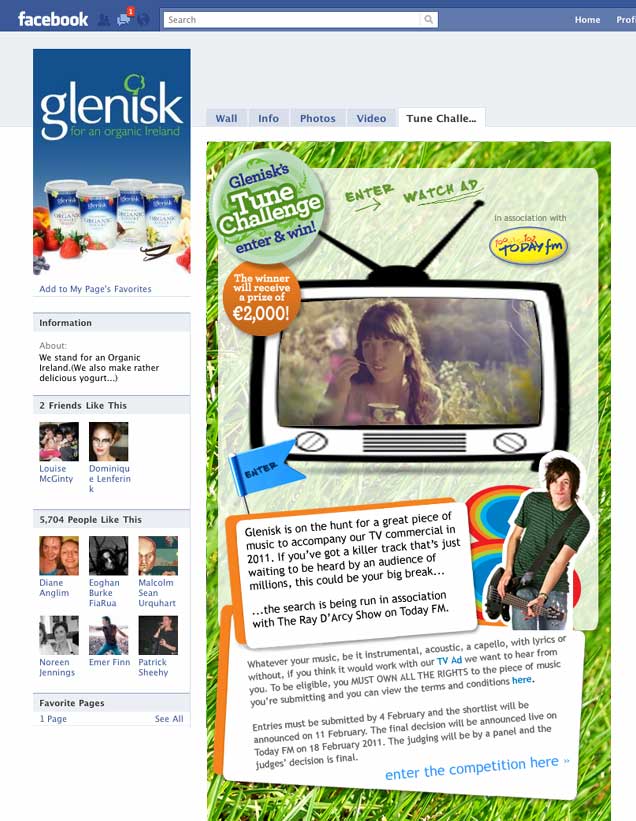
Facebook makes it easy to crowd source many business challenges including:
- Research and development: Want to innovate and solve more problems for your customers? Facebook can easily be used as a research tool and is one of the least costly and most efficient ways for you to do so.
- Marketing: What better way to create brand advocates that to allow your customers and fans to own your marketing? Encourage your Facebook community to contribute to your marketing ideas and initiatives.
Grow your page
There are many ways to grow your page:
- Social plugin: Include a Facebook plugin on your website.
- Social networks: Have you already built a Twitter or LinkedIn following? Let them know about your page.
- Newsletter: Make sure to let your newsletter subscriber list know about your page
- Other marketing: Integrate and include your Facebook page across all your advertising channels including TV, radio, newspapers, e-mail signatures, business cards etc.
- Physical location: Promote your page in your shop or your office.
- Incentives: Special offers or access to exclusive content is another effective method to get more people to like your page.
- Welcome video: Make a welcome video for new fans
- Questions Feature: Use the questions feature to poll your fans and drive new ones
- Fan of the: Recognise those fans that contribute most and thank them through ‘Fan of the’ initiatives.
Advertising
Facebook advertising is a different type of online advertising to Google Adwords. It’s important to understand the difference to be successful.
- People go to Google to look for things (search) so are often in buying mode when on there.
- People go to Facebook to socialise, not search so are not in buying mode when on there.
Targeting
Facebook advertising is target-based on:
- Location
- Demographics
- Interests
You can advertise:
- URLs
- Pages
- Applications
- Events
- Places
Ads must include:
- A headline
- Text
- photo
The Headline is limited to 25 characters and 90 characters for the body text. If you’re advertising a Page, app or event, the headline will automatically be the name that you’re advertising.
Options
Outside of the standard Facebook ad, other options include:
- Sponsored Stories: Lets you target your fan’s friends through actions taken by fans- likes, posts, check-ins, etc.
- Promoted Posts: Turn a post into an ad that appears at the top of fans’ news feeds, increasing the chance that more fans and their friends will see it too.
- Offers: Share discounts with fans by posting an offer to your Facebook Page. Offers can be used online or in store and can be distributed through the newsfeed or promoted as Sponsored Stories. Offers are limited to pages with 400 fans or more.
Promotions
Competitions and sweepstakes are another effective way to quickly grow your page but many pages risk having their pages shut down by not running them correctly.
Guidelines
If you are running a competition or sweepstakes, make sure to read the full list of promotion guidelines. In the meantime, here’s a summary:
- Promotions on Facebook must be administered with an App
- You can use a Facebook approved app or build your own. Apps must comply with the Facebook Platform Policies.
- You must acknowledge that the promotion is not sponsored, endorsed or administered by, or associated with, Facebook.
- You cannot use Facebook features or functionality as a promotion’s entry mechanism i.e. liking a Page.
- You cannot use the Like button, as a voting mechanism.
- You must not notify the winners through Facebook
Insights
The Insights Dashboard provides a selection of data that will help you to determine how successful your page, content and engagement strategy is at generating likes, visits, clicks, and engagement.
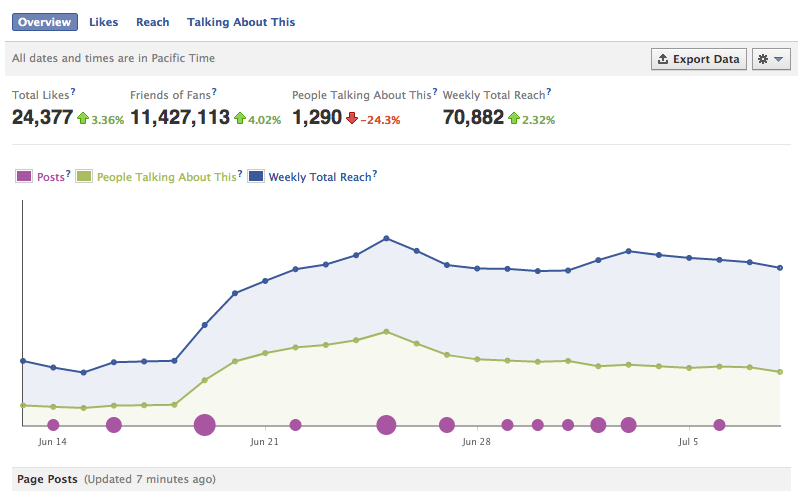
Overview
Total likes: Total likes tracks your monthly fan growth.
Page posts: Page posts are divided into six columns are tell you which posts are most effective at driving engagement:
- Date: When you posted
- Post: Excerpt from the post
- Reach: Unique number of people who have seen your post
- Engaged Users: People who have clicked on your post, including clicks on people’s names, timestamp, or the number of likes and clicks on the share link
- Talking About This: People who have created a story from your post, stories are created when someone likes, comments or shares
- Virality: People who have created a story out of the total reach of the post
Likes
The likes tab provides you with information about demographics and location of your fan base including:
- A daily table of your likes and unlikes
- Where your likes came from (how they found your page)
Reach
The reach tab provides information around your reach and frequency including a daily breakdown of visits to your page and your top referrers.
Export
The export button can provide you with some of the most valuable insights.
Select a time range and which type of report you’d like:
- Page level data: report on your entire Facebook page including total likes, unlikes, friends of fans, total impressions etc
- Post level data: report on individual post including likes, comments, shares as well as any negative feedback that post received (hidden or reported stories)
Apps
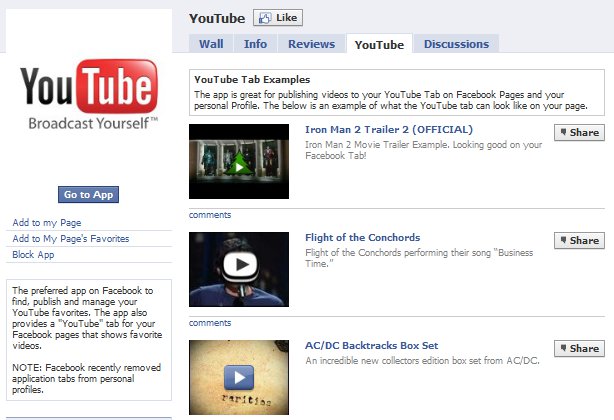
When you first start your page, it comes with some Facebook apps already added to the page. These standard apps include Photos, Videos, Links, and Events but there are also a huge numbers of 3rd party apps available that can help customize your page to help drive interaction with fans.
- It’s always a good idea to do some research and make sure that they are reliable and popular.
- Some apps can be installed from within Facebook but others are much easier to install by going to the website first.
Facebook ROI
- Sales: On The Beach achieve a ten-fold return on investment in travel sales by running a Facebook Ads campaign
- Bookings: ARIA Resort & Casino uses Facebook offers and ads to sell more than 1,500 room nights
- Retail Value: Bulmer’s Cider found the average retail value of its fans was worth £198.64 more to the brand a year than non-fans
- Product Launch: Cisco use Facebook and other social media to save over $100,000 on a new product Launch
- Growth: Mykidstime use Facebook to help double their traffic and sales in less than a year.
Understanding the Digital Economy
Social business reports
 To download our industry specific and researched social business reports, click here.
Guides
Contact us
If you would like to talk further about how Facebook can benefit your business? or if you would like The Ahain Group to help you along this path please feel free to contact us.
Connect: 


Niall Devitt
Niall Devitt is a doer, not a talker when it comes to social media. Niall advises organisations how to plan, design and implement social media strategies that generate real business returns. Niall is Chief Digital Strategist & Founder at the Ahain Group, an independent, ideas-led social business consultancy with experience of working with all types of clients and sectors– from large blue-chip multinationals to the 1 person SME. Download our industry specific and researched social business reports. In 2009, Niall co-founded TweakYourBiz.com (formally Bloggertone.com) an international, business community and online publication.
Follow Me:


