
Back To All Posts
Pinterest for Business: The Ultimate Guide

Pinterest is one of the newest social media channels which has really taken off in the last 12 months. It’s now the 3rd most popular social network site in the world [according to a study by Experian Hitwise]. Find out how you can use Pinterest to drive business and allow existing and potential customers to engage with your brand.
The business case for using Pinterest
- Pinterest is now estimated to have around 20 million users (ComScore).
- Companies are regularly paying top Pinterest users to pin items from their e-commerce sites – because the traffic is massive and worth the cost.
- The number of orders generated from pins has more than quadrupled in the last 6 months.
According to a study of e-shops on Shopify, the average order coming from Pinterest is now $80, higher than any other site including Google, Amazon and Facebook, which has an average of $40. Also note some of these key points from the study:
- Pins with price tags get 36% more likes than those without it
- Reports suggest that buyers coming from Pinterest are spending 10% more than the ones coming from other networks
- Brands are growing faster on Pinterest than on Twitter
Getting started
Pinterest is no different from other social media in that you build up a network of followers and you can follow key users. And as with any other social media, you need to make sure that using Pinterest meets your business and strategic objectives. Before you start, ask yourself:
- What are your goals and expectations?
- Is your target customer using Pinterest?
- Who exactly do you want to follow you on Pinterest?
- Can they become your customers?
- Which content would they find valuable?
- How often will you need to put new things on Pinterest?
Business account
Start by creating your Pinterest Business account. You will be asked to fill out a form and accept their terms & conditions.
If you had set up a Pinterest account as a user, you can convert your Pinterest account to a Business account.
Tip: Make sure to verify your website as you set up the Business account so that it will show up on your Pinterest profile. You will need to place a small piece of code on your website to have it verified.
Page and boards
Now that you have created or converted your account, you need to finish creating your page and start creating boards.
- There’s a Getting Started link which encourages you to add a Pin button to your browser called a Bookmarklet.
- It is also a good idea to add Pin It and Follow buttons to your website.
To create a board, click the Add button and then Create Board. Give your Board a name then start pinning to the Board.
Pinning strategy
Coming up with ideas for Pinterest is not that difficult because it is such a visual medium. The basic rule to remember is that each pin needs an image to go with it. To pin an item, the easiest way is to use the installed Bookmarklet on your browser. So you go to the article or piece of content you would like to pin to your board and click the Bookmarklet button. It will give you a drop-down list of your Boards and you:
- pick an image to go with the content - you will be shown any images that are within the article or content
- create a description of your pinned content. Take your time over this step to make sure it’s a strong description and enticing for people to click.
- put in the link that people will come to when they click the pin and
- submit.
Once you have submitted your pin, you can go and view it on the Board to make sure you are happy with it. There’s an edit option on all pinned items so you can always change the description or link.
Ideas for Boards
Here are 10 suggestions to get you started:
Products
You could create a board about a particular product or set of products with links to where they can be found on your site.
- So, for example, if you are an ecommerce site selling children’s wear, you could have a board on children’s coats and jackets with a range of them shown with pricing and links to where they can be purchased on your site.
- (Pinterest pins with prices get 36% more orders than those without)
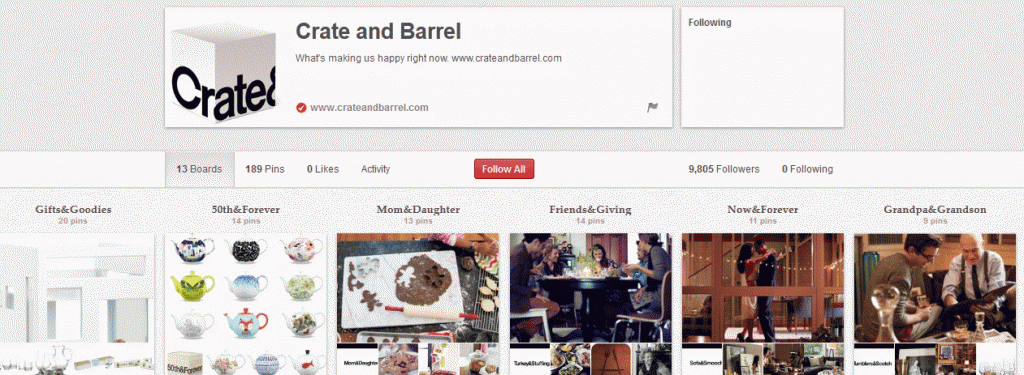
Crate and Barrel, retailers of furniture, home decor, gifts and housewares, use Pinterest to showcase products under Lifestyle Titles such as Friends & Giving or Grandpa & Grandson, evoking moments in people’s lives that their products will fit with.
Content
If you write a blog, pinning your blog posts regularly to your content board(s) will help disseminate your content. Or you could use it to curate content for your blog posts. So e.g. pin things that are of interest on a particular topic and come back to them when you are ready to write on that topic.
- Pinterest recently introduced secret boards which remain private until you decide to make them public (obviously all the baby items being pinned was giving too much information away!).
- You can use these in advance of seasons to prepare your content then launch them at the right time. Or for curating content without them being public.
If you are a B2B company, make good use of any white papers, articles or case studies you have by pinning to market yourself and your services.
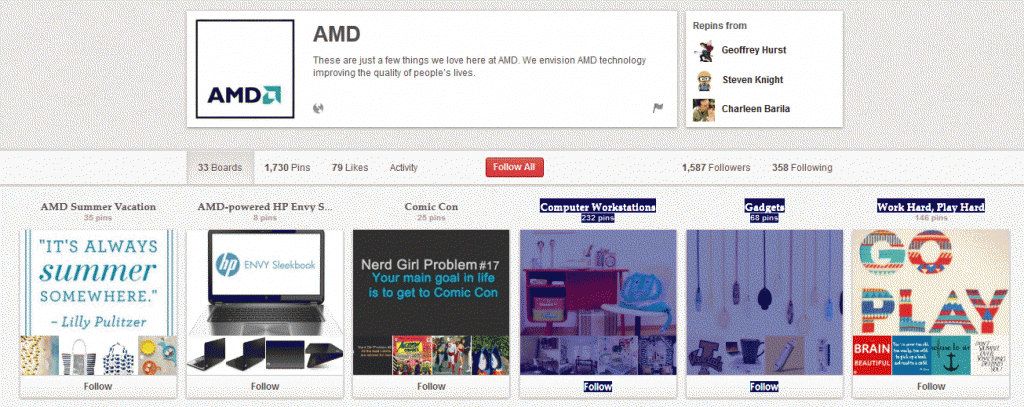
Or build on your brand aligned with your products/services. AMD describe themselves as “a semiconductor design innovator leading the next era of vivid digital experiences with its groundbreaking AMD Accelerated Processing Units (APUs) that power a wide range of computing devices.”
- Their Pinterest page includes funky boards with titles such as “Summer Vacation”, “Work Hard, Play Hard” and “Computer Workstations” where they have pinned lovely aspirational work spaces.
- All of which underlines in a neat way that their products fuel the workplace.
Testimonials
Do you have happy customers? Ask them to give you a short testimonial. Turn these into images and you can upload them to your Testimonials board and link to your testimonials page(s)
Customers
If you have a service business, why not showcase some of your customers by pinning their logos to a board (with their permission). If you have a B2C business why not pin a picture of Customer of the Month of Fan of the Month (with their permission of course) with a quote on how they have been using your service or what they think of it.
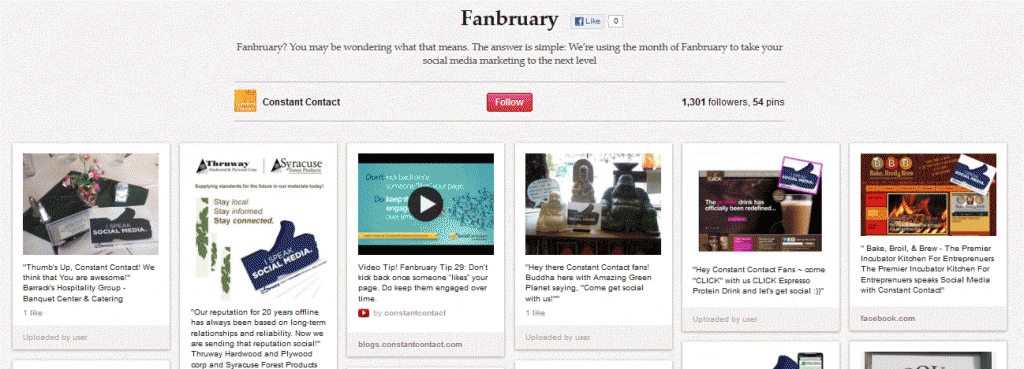
Constant Contact have a Board called Fanbruary which they use to engage with their fans. They put up quotes from happy Constant Contact users and share useful content that their fans will value.
Competitions
If you run regular giveaways, pin those up onto a Competitions Board. Or run a Pinterest based competition where people have to pin something to win something.
Lands’ End recently held a contest they coined: “Pin It to Win It”:
- Participants were encouraged to browse the Lands’ End site, create pins of items they liked and the most creative and stylish entries won prizes.
- Not only was it engaging, but it meant people had to click around the Lands’ End site and around the products.
Team
Pin up your team on a Board to show the people behind the business. On the Mykidstime Pinterest Page you will find the team of parents behind the website along with details of their favourite type of chocolate, deliberately chosen to show the human face of team behind the website.
Guests
Let your key customers who are on Pinterest pin onto a board on your Pinterest page to put them in front of your followers. Or if you have a strong audience on other social media ask them to become a brand advocate by adding them as a contributor to one of your Pinterest Boards.
Seasons
Use the seasonal holidays or interesting times of year to create and pin content. Christmas, Easter, Halloween lend themselves most naturally to this but be creative and use other days or events to tie in your products or content.
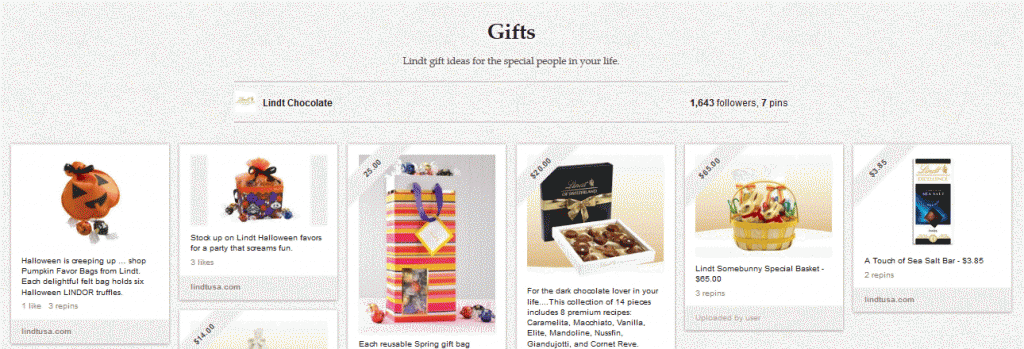
Lindt Chocolate uses seasonal boards to promote its chocolate products. Here’s a recent Gifts board that promotes Halloween gifts:
Market research
Why not try out new ideas and products on Pinterest? A recent Mashable post suggested using Pinterest as an online focus group to gauge reaction to new products.
Hashtags
As with Twitter and Instagram, Pinterest allows you to use hashtags which can then be used to pull up content. So use hashtags when pinning to help your products or key content to be found for certain keywords.
Your website
Don’t forget to add a pin button to your site along with your other social sharing buttons. Encourage your customers, followers, fans to pin content that they enjoy or find of value.
Monitoring
As with all your other social media channels, you should constantly monitor how much traffic and sales are being generated by Pinterest.
By default Google Analytics (GA) only tracks pages containing tracking code, usually the internal pages of your website. To track external pages such as links to social media pages, you need to set up a ‘virtual page view’.
This is an additional piece of code that you add to the hyperlink for the external page. When the link is clicked on, it is shown in the GA reports as a virtual page view.
As a recent addition to GA, you can now view your social interactions. By default, your interactions will be visible in GA. For all other social accounts, you will need to customise your account and add something called ‘Social Analytics’.
- This consists of a piece of additional tracking code called the _trackSocial method: _gaq.push(['_trackSocial', network, socialAction, opt_target, opt_pagePath]);
- You would replace the values for network and socialAction in the string with the values you are tracking e.g. ‘Twitter’ and ‘tweet’ / ‘Facebook’ and ’share’.
You will then be able to see the actions and the platform level data within your Analytics.
Pinterest ROI
- Traffic: Sony’s Pinterest boards have driven an 800% increase in traffic from Pinterest to the Sony store website. (Mashable)
- Referrals: Pinterest was the fourth-biggest source of referral traffic in August, accounting for 1.84 percent of referral traffic – more than Yahoo, Bing or Twitter (Shareaholic)
- Revenue: Pinterest drives 4x more revenue than Twitter or Facebook (VentureBeat).
- Word of Mouth: Amazon Zappos users are 13x more likely to share a purchase on Pinterest than on Twitter (Bloomberg)
- Promotions: Dobango’s Pinterest Contest increased its Traffic by 167% (Pinterest Case Studies).
We hope that this information will help with your business and its use of Pinterest. Most importantly to grow your brand on Pinterest be yourself, share and engage. How is your company or brand using Pinterest? Have you seen benefits from using Pinterest?
Understanding the Digital Economy
Social business reports
 To download our industry specific and researched social business reports, click here.
Guides
Contact us
If you would like to talk further about how Pinterest can benefit your business, or if you would like The Ahain Group to help you along this path please feel free to contact us.
Connect: 



Jill Holtz
Jill has worked in the US, UK and Ireland in the fields of business analysis and Customer Relationship Management, including e-commerce data mining and marketing support, with extensive project and people management experience. During her time working in a variety of sectors including utilities and services, Jill has managed projects for British Gas, The Scottish Office, RBS, Advanta, Royal Bank of Scotland, Barclays Bank and AIB amongst other clients. Originally from Scotland, Jill moved to Galway in 2002 and completed an Executive MBA at NUI Galway, before continuing to work as a consultant and setting up her own web business.
Follow Me:

