
Back To All Posts
Podio Business Guide: Project Management Software & Collaborative Work Platform

Podio is a very special platform with brilliant features and functionality. Podio is a new project management software and collaborative work platform to emerge over the last few years along with the likes of Jive, Yammer, BaseCamp and others. This is the first of a three part series on Podio. When we reviewed these project management software and collaborative work platforms for use at The Ahain Group, we found Podio’s flexibility and intuitive set up to be a real eye opener. Disclosure: We liked the platform so much we have since become Preferred Partners to Podio in Ireland.
What is Podio?
Podio is an online project management software and collaborative work platform that can be used by any business or organisation, allowing staff to work collaboratively in a secure and non- technically challenging environment.

- It allows for the handling of multiple projects, document sharing/storage and everyday management of workflows within any business or organisation,
- Podio unites your team, content, tasks and communications, enabling you to manage projects and run business processes like sales, recruiting and more – without email overload and document chaos.
.png)
The business case for using Podio
- Increased efficiency within your business
- Better collaboration amongst team members
- A secure location for all your project management
- One location for all mission critical and case sensitive documents
- Log-in can take place from anywhere in the world, from any device, at any time of day
- You can add in clients/people from outside your business to their project securely within that project workspace
Pricing and Plans
There are three options available for membership:
- Podio Lite (free) - This option allows you to have 5 users internally and 5 externally with access to the core features and Apps.
- Podio Teams (paid) - This option allows you unlimited employees and you have unlimited external team members at no extra charge. This gives you full access to core features and Apps plus access rights and control. It is $15 per month and you can avail of 20% discount if you commit to a yearly plan.
- Podio for Business (paid) - This option is for large business or enterprise clients. It includes all the mentioned features plus personalised training and support. Podio do not include a pricing plan on this option, they ask that the business contacts them directly to discuss their needs.
Setting up
- Go to the Podio sign-up page
- Enter your work email address
- Click on sign-up
Note: you can also use Facebook, Google, Windows Live or Go To Meet
Complete your profile
After you have signed-up you need to edit your profile:
- Click the profile icon in the top blue bar,
- then select “My Profile” and “Edit Profile”
- and set your permissions on notifications.
Make sure to include your avatar/picture as people are happier interacting with you when they can see your picture.
Invite work colleagues
You can then add all your fellow employees in a few clicks by using your contacts from Google, Outlook or vCards. Alternatively, you can manually enter the email addresses of the people you would like to invite.
Post an update in the stream
To post a status update you type your message in the dialog box and you can then include or leave people out of updates by using the @mention feature. This is a similar feature to tagging on Facebook. The update will be in the stream for everyone to see in the employee work stream. Those @mentioned will get an update of the mention, depending on how they have configured their personal profile.
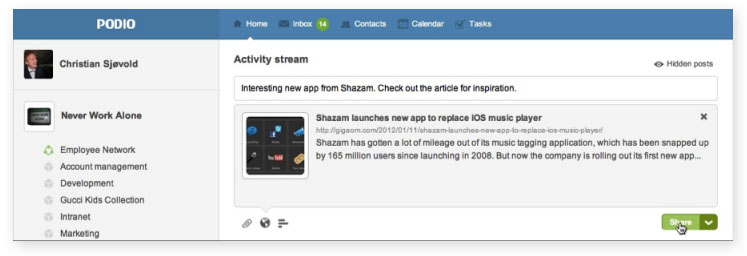
You can also add the following below the update:
- Share a File
- Share a Link
- Share a Question
The icons are clearly visible below the dialog box.
Live chat
This is a recently added feature which allows you to click on the avatar in the Chat bar of the work colleague or colleagues you wish to “live chat” to. It allows you to discuss an ongoing project without having to leave the Podio platform and cuts down on emails or phone calls as the “chat” is in real time.
Employee Network
The Employee Network is a place to communicate with your entire company.
Within your Employee Network’s activity stream you can share:
- Status updates,
- files,
- questions,
- links,
- images,
- and tasks.
Sharing something in the Employee Network could be used instead of internal email when wanting to share and discuss things with the entire organization.
Workspaces
Workspaces are for specific groups of people within your network/business who are working on projects or ongoing processes; a place for project teams to complete their daily workflows, share documents, collaborate and interact with one another.
- People generally name their workspaces after departments, clients, teams or projects, e.g. “HR”, “Sales” or “Project Podio “.
- You can then invite internal or external collaborators and add apps to get your work done. All the members of an organisation’s Employee Network can create workspaces in that organisation.
- External members cannot create workspaces within your organisation.
- Click the “Create workspace” button in the left navigation.
- Then set basic permissions for the workspace.
Workspaces can either be:
- Open, whereby your whole organisation can see them,
- Or private, meaning they are strictly invite-only.
Open workspaces can also be set to auto-join. That means any new employee signing up for Podio will be automatically added to the space. Note: auto-joining does NOT affect existing users.
Podio Apps
This for me is the distinguishing feature of Podio.
All workspaces come with some apps already installed and you can further add/remove apps so as to customise that workspace for your particular needs. You can archive these pre-installed apps and restore them later if necessary.
- Click the wrench icon to the right of the app, and then select Archive app. Or, click the wrench icon next to the workspace name in the left navigation and select “Manage apps”. You can archive any of your apps from there.
- If you’d like to un-archive an app, you can do so via the “Manage apps” menu.
Apps Market
There are hundreds of pre-prepared apps that are readily available in the Podio app market. The App Market is accessible via the “Add App” button at the top of any workspace.
Getting apps is free and can be done in seconds:
- Use the “Find an app” search tool in the upper left corner of the page to search for an app, or browse popular apps that other Podio users have found useful for them.
- When you’ve found an app you wish to install, click the green “Get App” button for that app, select the workspace you wish to add it to, and the app will then be added to that workspace.
The Apps and Apps market allows a very high level of customisation. I have only touched the surface here but will expand on this over the next two posts in this series.
Creating tasks
There are a number of ways to create tasks on Podio:
- Click the task icon in the top blue bar. This is also a complete overview of your existing tasks, tasks you delegated, and tasks you are working on.
- You can create a task via email - hit the “Create a task from email” link in right side.
- You can give a task to someone on Podio by going to their profile page and adding it from there.
- On any app item in Podio e.g. a deliverable or a meeting, just press the task icon in the right side bar to create a task. It will be attached to the item.
- On a workspace, press the task icon, and start creating tasks for that particular group of people.
- If you’ve added the Podio Google Gadget you can create tasks right out of your emails in your Google Apps Gmail inbox.
- You can assign tasks to anyone, even people not on Podio yet.
Using tasks and apps together
Podio ROI
Here are just some examples of Podio ROI:
- Economy - See how Clonmel Chamber of Commerce is helping the local economy with Podio.
- Marketing - Discover how the Cirque du Soleil marketing team from Las Vegas use Podio to run their marketing processes.
- Education - See how ESA are revolutionizing how they deliver education with Podio.
- Eliminate Silos - Read about how Plinga eliminate silos and double bookkeeping with Podio.
- CRM - Discover how Podio provides a flexible and mobile CRM for Ekito.
Conclusion:
Podio is a clever and easy to use platform that has been designed with both people and business in mind. You can bring your people, projects and workflows to Podio without having Podio impose its workflow style on you.
Please check back with us for parts 2 and 3 in this series on Podio, where we will be providing you with additional guidance on how to get the most from the platform, and taking you through the apps features and functionality in more detail. Acknowledgement: I have used Podio.com as a reference point and for videos & images.
Understanding the Digital Economy
Reports:
 E-Commerce
- Food and Drink Sector
- International Student Recruitment
- General and Health Insurance
- FMCG Sector – Retail and Ecommerce
- Attracting Top Tier Talent
- Social Media in Politics
Guides:
Contact us
If you would like to talk to The Ahain Group about Podio please feel free to contact us.
Connect: 


John Twohig
As Co-Founder of Ahain Group he has identified a need for Irish and UK business to leverage social business and is providing the leadership in this role, drawing together the best of Irish and UK talent in the online space. John has a sales background with a 30-year career in retail management. As a qualified business coach and mentor, John excels in clarifying and understanding business challenges. John blogs regularly on the Social Business Model and is considered as a thought leader in this space. John had also identified that Multi-Directional Expressive Capability (MDEC) is a key component in the success of any online marketing initiative. His White Paper on MDEC will be published in July this year.
Follow Me:


